Your Flight Paths on a 3D Globe
A flat map stretches the world: the poles balloon, the Pacific is split down the middle, and long flights bend into strange arcs. On a globe, every route sits where it really is. Tap 3D on your flight map and it bends into a globe you can spin with a finger or a mouse, with each flight lifted off the surface in an arch, higher the further it goes. It works with the flights you have already logged, it is free, and you do not need an account.
One tap on 3D: your flat map bends into a globe, ready to spin.
Everything Your Map Does, on a Globe
The globe is the same map, not a separate picture, so what you use on the flat map works on it too:
- Lifted routes: Every flight rises off the surface in an arch with its shadow underneath, taller for longer flights, so crossing routes never blur together
- Spin and zoom: Drag to turn the world, scroll or pinch to zoom, and it keeps turning a little when you let go
- Flight details: Hover or tap a route to open the same card as on the map, with the date, the distance and a link to search fares
- Airport labels: Turn labels on and every airport shows its code and flag, placed so they never overlap
- Map modes: Colour your routes by year, airline, distance or time of day, shade the countries you have visited or make your busiest airports glow
- Replay: Play your flights back in order and watch the globe turn to follow each one
- Add flights on it: A new flight draws itself onto the globe, with a plane flying the route
- Dark mode: A night-time globe with glowing routes when your device is set to dark mode
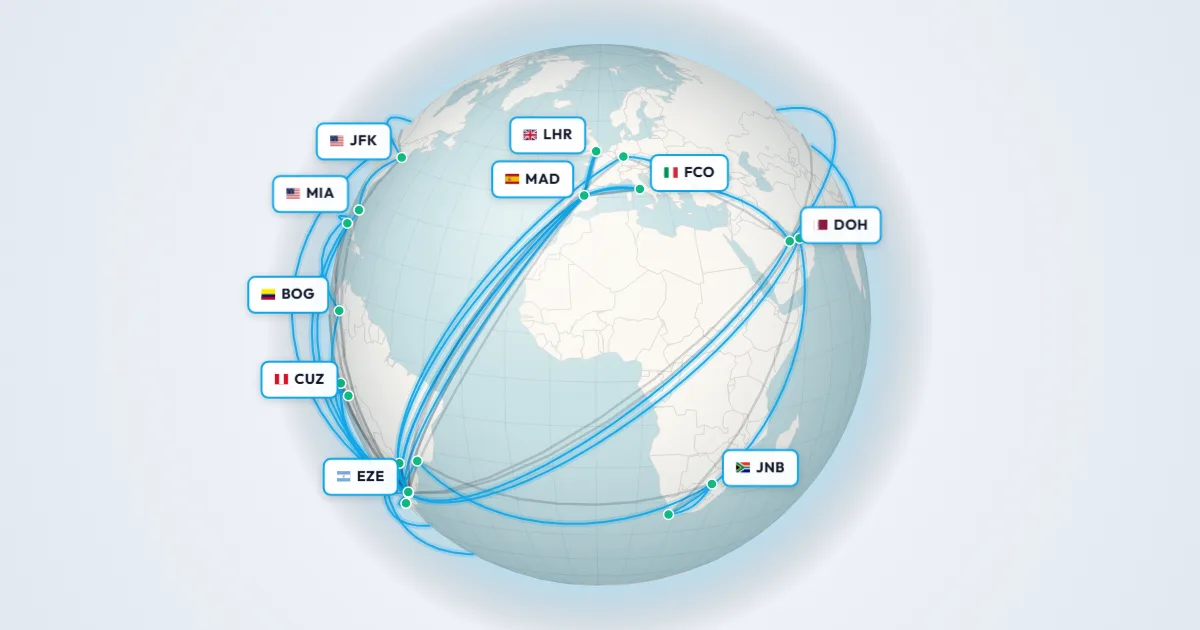
Airport labels on the globe: the code and flag of every airport you have flown through.
Why Flight Paths Look Curved on a Flat Map
Planes fly the shortest path between two airports, and on a round planet that path is a great circle: the line you get by pulling a string tight between two points on a globe. Drawn on a flat map, the same line bends towards the nearest pole, which is why a flight from New York to Hong Kong seems to take a detour over the Arctic.
On a globe there is nothing to explain. Great circles look as straight as they are, polar routes cross the top of the world where they really do, and a flight over the Pacific is one continuous arc instead of two pieces on opposite edges of the map. That is the best reason to look at your flights in 3D: the real shape of your travels, without the distortion.
How to See Your Flights on a Globe
- Add your flights: Type them in, click the airports on the map, import a CSV or scan your boarding passes. New here? The globe starts with sample routes, so you can try it first.
- Tap 3D: The button sits under the zoom controls on a computer, and in the top left corner of the map on a phone.
- Explore: Drag to spin the globe, zoom in on a region and open any route for its details.
- Tap 2D to go back: The globe bends back into your flat map, right where you left it.
Share Your Globe
Open the share menu while the globe is on screen and the image shows the side you are looking at, with your title and stats. Prefer a video? The share video turns the globe to follow every flight as it is drawn, so even the routes on the far side of the world get their moment.
Frequently Asked Questions
Is the flight globe free?
Yes. The globe is part of the free flight map, and you do not need an account. Sign up only if you want your flights saved and synced across your devices.
Does it work on my phone?
Yes. Tap 3D in the top left corner of the map, drag with one finger to spin the globe and pinch to zoom.
Can I share an image or a video of the globe?
Yes. With the globe on screen, the share menu makes an image of the side you are looking at, or a video that turns the globe to follow each of your flights.
Why are some routes higher than others?
Each route is drawn as an arch that grows with the length of the flight, so long-haul flights rise above short hops and you can tell them apart where they cross.
Can I replay my flights on the globe?
Yes. Start the replay from the map while the globe is open and it plays on the globe, turning to face each flight as it is flown.
Your flights, the way the world really is: round.